08 June 2009
See it in action:
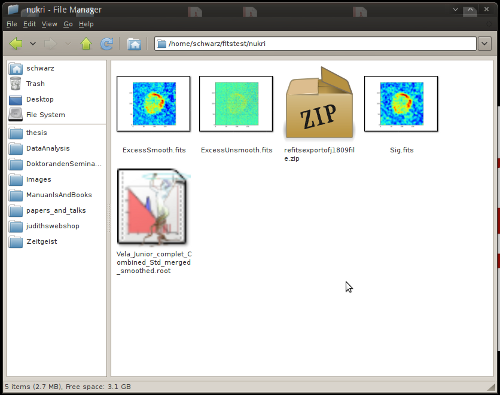
There are actually a lot of cases, where this will not work, it will not take WCS into account and is in general not very sophisticated, but it works for me (TM). For more information about Thunar thumbnailers see:
Customizing Thunar
Additional thunar thumbnailers
Freedesktop thumbnailer spezification
Freedesktop desktop-entry spezification
comments powered by Disqus
A FITS thumbnailer for Thunar
If you work in Astronomy, you will likely have a lot of fits files lying around. Although the FITS format is absolutely not an image-only format, I would still like to see a preview in my filemanager if there is an image encoded in the file. The standard thumbnailers for Xubuntu don't do this, so here is how to create your own:- create a desktop file that describes, what your thumbnailer does:
/usr/share/thumbnailers/fits-thumbnailer.desktop[Desktop Entry] Version=1.0 Encoding=UTF-8 Type=X-Thumbnailer Name=FITS Thumbnailer MimeType=image/x-fits;image/fits;application/fits; X-Thumbnailer-Exec=python /usr/lib/thunar-thumbnailers/fits-thumbnailer.py %i %o %s
- create the thumbnailer script under:
/usr/lib/thunar-thumbnailers/fits-thumbnailer.py#!/usr/bin/env python import pyfits import matplotlib.pyplot as plt import sys try: infile = sys.argv[1] outfile = sys.argv[2] except: exit(1) try: size = sys.argv[3] except: size = 256 hdul = pyfits.open(infile) data = None # Is the primary HeaderDataUnit an image with data? if (hdul[0].header["NAXIS"] != 0): data = hdul[0].data else: # The primary had no data, so we search for the first image! for hdu in hdul[1:]: if (hdu.header["XTENSION"] == "IMAGE"): data = hdu.data break if data != None: plt.imshow(data) plt.savefig(outfile, transparent=False, format="png") - regenerate the thumbnailer cache:
/usr/lib/thunar/thunar-vfs-update-thumbnailers-cache-1
See it in action:
There are actually a lot of cases, where this will not work, it will not take WCS into account and is in general not very sophisticated, but it works for me (TM). For more information about Thunar thumbnailers see:
Customizing Thunar
Additional thunar thumbnailers
Freedesktop thumbnailer spezification
Freedesktop desktop-entry spezification